
Get +3 Free ChatGPT Exports with a Chrome Store Review
How the Chrome Web Store review bonus works for ChatGPT, Claude, and Gemini Power Exporter: claim +3 exports in the extension popup after an honest review.
Read guide →Bulk backup ChatGPT conversations to HTML, JSON, or Markdown. Free for 5 chats. One €19 Pro license unlocks unlimited export on ChatGPT, Claude, and Gemini forever. No subscription.
See how it works. No account. Local export. Less than €7 per AI exporter. No monthly fee.
Assistant
I can help you export your entire conversation history...
ChatGPT Exporter
Exporting 26 / 42...
Install free on any AI you use. No subscription. Pay once and unlock unlimited exports on ChatGPT, Claude, and Gemini for life.
ChatGPT
Export ChatGPT to HTML, JSON & Markdown
Free install · Pro unlocks all 3 →
Claude
Export Claude to HTML, JSON & Markdown
Free install · Pro unlocks all 3 →
Gemini
Export Gemini to HTML, JSON & Markdown
Free install · Pro unlocks all 3 →
Click the extension, pick your chats and format, and download one HTML, JSON, or Markdown file.
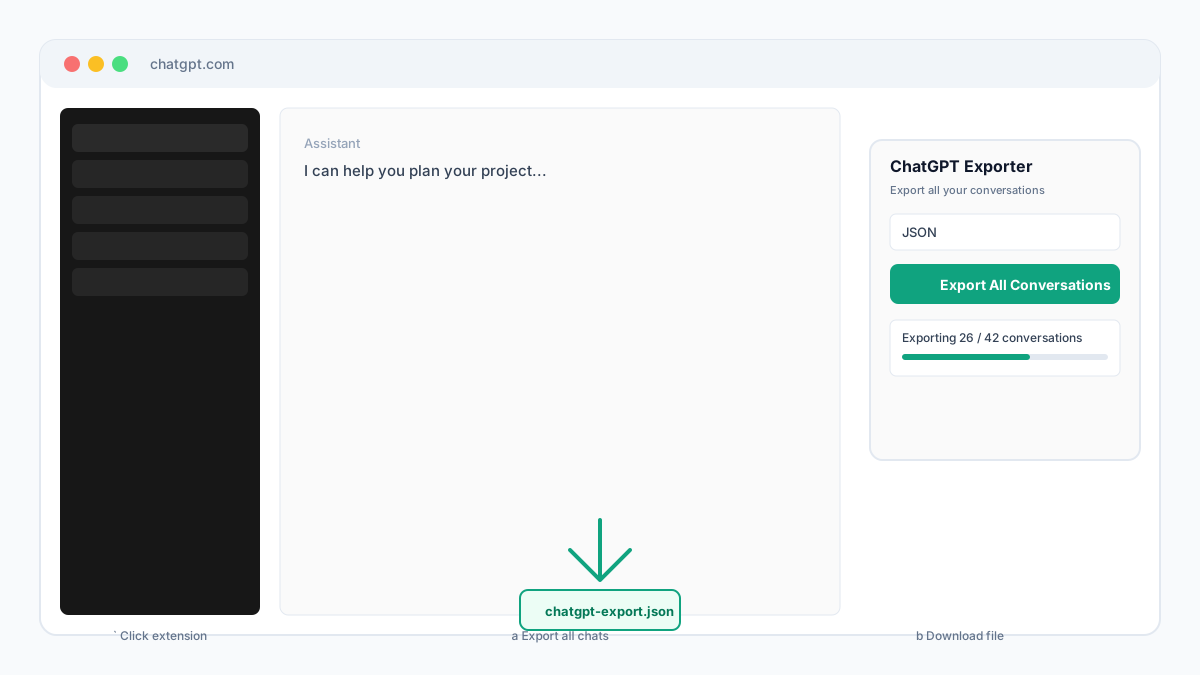
Click extension icon
Open the popup on chatgpt.com
Choose chats & format
All chats or pick specific ones
Download one file
HTML, JSON, or Markdown
HTML for everyday users. JSON and Markdown for power users. One Chrome extension, one click.
Download ChatGPT chats as a clean HTML file you can open in any browser. Print to PDF from your browser when you want a shareable copy.
Export your full ChatGPT library in one run from your logged-in session, or hand-pick specific conversations into a single file.
Developers get structured JSON for scripts and apps. Markdown works for Notion, Obsidian, and long-term archives.
Export runs in your browser using your logged-in ChatGPT session. Chat content is not sent to our servers.
Three steps to download ChatGPT history. Takes less than a minute to start.
Add ChatGPT Power Exporter to Chrome in one click. No signup, no configuration.
Go to chatgpt.com and sign in. Stay on the ChatGPT tab while you export.
Pick HTML, JSON, or Markdown. Export all chats or select specific ones, then save one file.
No subscription. Pay once and unlock unlimited exports on ChatGPT, Claude, and Gemini for life. Start free on ChatGPT, then upgrade when you need the full library.
Free
€0
Perfect to try ChatGPT Power Exporter
Pro
€29€19one-time · forever
Launch price for the first 100 Pro licenses · then €29
ChatGPT + Claude + Gemini exporters
Less than €7 per AI exporter. No monthly fee.
Review bonus
Leave an honest review on the Chrome Web Store for ChatGPT Power Exporter, then upload a screenshot in the extension popup and unlock +3 bonus conversation exports (one-time). Claim only happens in the popup, not on this website. Unlimited Pro remains €19 one-time.
Practical export workflows for ChatGPT and beyond.
How the Chrome Web Store review bonus works for ChatGPT, Claude, and Gemini Power Exporter: claim +3 exports in the extension popup after an honest review.
Read guide →How one €19 lifetime Pro key unlocks unlimited HTML, JSON, and Markdown export on ChatGPT, Claude, and Gemini Power Exporters. No subscription.
Read guide →Turn ChatGPT, Claude, and Gemini conversations into Obsidian Markdown notes. Local Chrome export workflow for a durable second brain.
Read guide →Answers about exporting ChatGPT chats with ChatGPT Power Exporter.
Whether you're a researcher, developer, or power user, stop losing valuable conversations. One Pro license also unlocks ChatGPT, Claude, and Gemini exporters.
1-click
Export
100%
Local & private
3 formats
HTML, JSON & MD
“Used by early ChatGPT power users who need their data backed up and searchable.”
“Saves hours of manual copy-paste when archiving months of conversations.”
“Finally a simple way to download ChatGPT history without hacks or scripts.”
Free install for 5 exports on ChatGPT. Need everything? No subscription. Pay once and unlock unlimited exports on ChatGPT, Claude, and Gemini for life.